Web content & PDFs – Instapaper & Kindle Miracle Solution
 Its been a while since my last post….sounds like a confessional..however I’ve not really been drawn to write a post until now and blogging for blogging sake is a waste of everyone’s time. Hopefully you’ll find the following information/solution as useful as I have.
The problem part 1: loads of RSS feeds, iGoogle dashboard widgets with tantalising headlines, pdfs with industry analysis, MS Word based thought leadership papers etc.
The problem part 2: I want/need to read it all but not in 3 or 4 different locations (ie. Instapaper for web files, Goodreader/Evernote on iPad for PDFs, Laptop for either and/or Word files)
The problem part 3: I need to prioritise reading below other recurring daily tasks (ie normal work) but still be able to consume the content.
The problem part 4: Serious eye strain from looking at backlit screens (laptop, desktop monitor, iPhone, TV, iPad).
The solution:
Setup
- Get a Kindle
- Use Instapaper as the one stop solution. Set up an account here
- Install the bookmarklet in your browser.
- Install Mobipocket Creator from here – sorry PC only.
- Install dropbox – why haven’t you got it already?
- Install Ephemera from here if you use OSX – or Wordcycler if you’ve got a PC [Note: I use ephemera as I collate/collect content during the day on my PC and sync my Kindle with my Mac when I get home]
Workflow
- For every blog post / web page that you want to read, open it, clip it with the bookmarklet, close it.
- Use Mobipocket to convert PDFs into an ‘instapaper’ folder within your Public dropbox folder. [Note: only do this with documents which are not confidential as by saving them within your public folder you’re placing them in the public domain.]
- Open the instapaper folder and then the converted document folder, right clicking on the html file and choose the ‘Copy Public Link’ from the dropbox contextual menu.
- Open a browser, paste, and use the Instapaper bookmarklet to clip it for later.
- Plug Kindle into Mac/PC and Ephemera/Wordcycler will sync your content to your Kindle for reading at your leisure.
The real genius with the above solution is getting PDFs converted to text by Mobipocket Creator so that Instapaper can do its magic and Ephemera can get it onto your Kindle with the minimum of fuss. Googling, I noticed a lot people wanted to ‘clip pdfs to instapaper’ but found no solutions – I hope the above workflow works for you. It may seem onerous but initial set up is 15 minutes max and the main workflow is actually very quick. The key is that I can capture information I want to read but not have it interrupt my working day.
Related Articles
- Instapaper: Manage your time smarter on the Web (socialmedia.biz)
- How to transfer Instapaper to Kindle 3 (ask.metafilter.com)
- The Best Stuff to Read With Instapaper While You’re Stuck in Longass Airport Lines [IPhone] (gizmodo.com)
- Wordcycler: Two-Way Instapaper Sync for Windows and Your E-book Reader (wordcycler.com)
- Use Instapaper to save articles to your Kindle (teleread.com)
Why Blackberry is a big FAIL!
 I used to sing Blackberry’s praises. I was one of the ‘early consumer adopters’ of the device and it was fantastic for picking up my emails and reasonably good at making calls – great for accessing my personal mail when these services were blocked by employers! It was a few years later until I was deemed important enough to be ‘granted’ one for work purposes and at the time the device turned up working for me. I generally had no complaints using the device but when compared to the iPhone, it was a hardly a comparable experience so I ditched the Blackberry and migrated my work email / contacts / task manager over to my personal iPhone.
Only recently have I had the ‘pleasure’ of provisioning one for myself. The results….disasterous. I compare my experience to that of my iPhone 3GS. As a self certified Apple Fanboy, you may think I’m not the most objective of individuals to comment however if any of the following rings true to you and stays the same, Apple quite deservedly should trounce the smartphone market.
Why was I doing it – I was reviewing our in house contact management system and have been trialling new two way syncing functionality. I needed one of each device (Blackberry, Nokia, iPhone) to test various performance and usability criteria. What I wanted was a ‘test phone’ which I could use for a short period principally for data but possibly making the odd test call.
For the iPhone, I used my current personal & business phone, I added another MS Exchange account (thanks to iOS4), keyed in the login info and server address, decided on mail, contacts, and/or notes, and selected ok. Done. OK, so I had to wait c. 30 minutes for the c.5000 contacts to download to the device but that was it.
Next, the Blackberry. First, you have to apply to the hosted email provider for a ‘Blackberry Enterprise Server‘ licence for the princely sum of £15 per month – I still don’t know what this is for – presumably the ‘push’ functionality however its strange how my iPhone ‘pings’ well before my Blackberry ‘vibrates’ with the arrival of new mail. Next you need a ‘Blackberry data’ account. Normal data just won’t do….it has to be ‘Blackberry data’…..That oh so special ‘Blackberry data’!!
So I couldn’t just swap my iPhone (data enabled) sim into the Blackberry to do the testing. I needed another sim. Right, well I didn’t want a contract as I only wanted to do adhoc testing. So pay as you go seemed the smart move.
I tried 3, Vodafone, T-Mobile, and O2 – when I said I tried I don’t mean I went into the store….I mean I actually obtained a sim, charged it with credit after confirming that it would work with the relevant customer service staff and tried the activation sequence with the password issued by the email hosting provider that was providing the ‘Blackberry exchange server’ licence. The result. It didn’t work. After various attempts, hours on the phone, and wasted visits to the stores and calls to customer service personnel, I eventually discovered that the networks don’t support ‘BES’ on pay as you go, only ‘BIS’ ie. ‘Blackberry Internet Server’.
My options were a 24 month contract (minimum £10 per month + a £5 Blackberry tariff) on vodafone, a £28, 18 month contract on O2, no option on 3 as the phone was too old! – a 2 year old Blackberry Curve 8310, or £15, 18 month contract on T-Mobile. What a farce…I wanted a limited, short term, low cost, data only sim and no one could do it.
The comparable sim that would enable the same testing functionality on the iPhone as I was after on the Blackberry, was a 30 day rolling contract with 2 Gb of data from 3 for £5 a month.
The whole process took over a week and when compared to the c.10 minutes the iPhone its no wonder the iPhone is becoming more popular in IT departments around the world. Unless Blackberry/RIM really ups its game and abolishes the ridiculous server side licence charges and ‘Blackberry data’ protocol they’ll see their market share diminish significantly as iPhone and Andoid devices make the user’s experience that much easier.
Related articles by Zemanta
- BlackBerry maker angry at Apple claims over signal reception (guardian.co.uk)
- Did The iPhone 4 Just Kill The Blackberry’s Buzz? (thenextweb.com)
- Verizon Motorola Droid 2, BlackBerry Storm3, Curve3 Leak (phonereport.info)

Great sadness at the fall of a giant
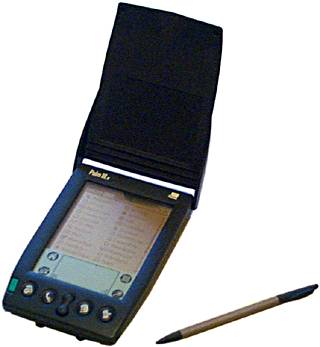 Like many others I’ve been reading the press around the expected demise of one of the consumer electronics most innovative companies – Palm.
With the exception of the Psion Series 3A, (which I used occasionally), my Palm III PDA (bought for me by my Dad when I was at school) was my first foray into the world of gadgetry and the beginning of a long love of gadgets thereafter. Whilst my schedule in those days was significantly less hectic than today, I was still able to update my basketball and football practices, and phone numbers and addresses (no emails in those days) of my buddies; have access to a calculator, and various other productivity tools. I was always amazed at the handwriting recognition (albeit one letter at a time but incredibly accurate ‘Grafitti’) and occasionally marvelled at the ability to beam notes and contacts to other Palm users (well, my Dad).
After a few years with the Palm III, I upgraded to the Palm V, a little slicker with a bit more memory and an SD card interface which meant you could add addtional programs, storage etc. A popular addition was that of a dictionary/thesaurus – too expensive for me at the time I recall (£40). With the addition of an infrared enabled Nokia mobile phone I was also able to connect to the internet which was quite an experience! Not exactly quick but good enough for downloading some weather info for sailing while abroad. I remember being very efficient as a data call back then was an expensive international call from a mobile phone (no Vodafone passport then!) – given the speed of the Nokia modem, I dread to think how much the data transfer costs would be per Mb.
Latterly, I used the palm as a first gen ebook reader. I have to say that even now it could give the likes of the the Nook, Kindle, and iPad a run for their money in terms of ease of use and reading pleasure and that was over 10 years ago. The mono-chromed non-backlit display gave no eye strain and the size of the pda (similar to the iphone) was comfortable to hold with the central up/down cursor button making it easy to change pages.
The move to a rechargeable battery was good in some senses (slimmer, cheaper to run etc.) but but bad in others. As we all know, rechargeable batteries that cannot be removed, result in devices having a very definate shelf life – the fate of both my Palm Vs. I suspect if I still had a Palm III I could slip a few AAA batteries and get up and running in a couple of minutes.
I’d like to think that Palm isn’t done yet and that its going to come up fighting. I love my iPhone and think that the Palm Pre was a poor imitation but it was still a lot better than the majority of android devices I’ve seen. Come on Palm – step up to the mark and reclaim your place as one of the world’s leading consumer electronics firms.
Related articles by Zemanta
- Report: Palm putting itself up for sale (news.cnet.com)
- HTC May Buy Palm to Fight Apple [Rumor] (gizmodo.com)
- Four Ways to Save the Palm Brand (adage.com)
- Who Wants to Buy Palm? Anyone, Anyone… (blogs.wsj.com)
- Lenovo eyeing Palm, Verizon profits, Android to get auto app updates (phonemag.com)
![Reblog this post [with Zemanta]](https://i0.wp.com/img.zemanta.com/reblog_e.png)
Excel and Autorecover not working – a fix

- Image via Wikipedia

Excel is undoubtedly a key tool for the financial modeller. Part of my job is financial modelling so I spend most of my days with Excel open at least in the background and rather than having to rely on myself to save files in the event of a computer meltdown, I rely on Excel’s Autorecover feature.
This has saved my bacon on more than one occasion. Frequently Excel has crashed under the strain of my underpowered Dell and I’ve looked in my saved dropbox directory for the latest saved version only to find that it is more than six hours ago….a day wasted..or perhaps not.
The first port of call, open excel and hope for a recent autorecover with no repairs. In 95% of cases this usually occurs and you can get away with losing at most an hour of work – anoying but less so than losing six hours.
Anyway, today was the first time in memory (where I’ve had autorecover enabled – I sometimes turn it off but more on that in a later post) where I opened a fresh instance of excel after a crash….no autorecover file. After a couple of expletives I checked my autorecover settings and indeed excel should have opened a recovery file. It did not. There was a file there indicative of an autorecover that had saved about 15 minutes before the crash so why was Excel doing nothing?
Now what. Google help, as I last saved the file 3 hours ago!
Google was no help. It provided me with a couple of links to Microsofts support site (or useless confusion site I as I prefer to refer to it as) explaining what autorecover was but no tangible support on what to do when it didn’t work. What I did managed to ascertain was that Excel uses .xar files for autorecover. So I navigated to the appropriate directory and tried to open the .xar file. The usual ‘Which program would you like to use’ dialogue box opened up – generally meaning the computer has no idea what to do with the file. I therefore cancelled the option and fretted for a couple of minutes.
Then I tried going into excel and opening said .xar file from the menu selecting the ‘All Files’ option and choosing the apparently created autorecover file. Hallelujah – it worked – document opened with only a couple of minutes work lost.
Was definately worth checking if I could use that apparently unactionable .xar file.
Related articles by Zemanta
- Sexy Models of the Financial Kind (thomasmbragg.com)
- 40+ Cool Features of Microsoft Excel 2010 (teabreak.pk)
- Change The AutoRecover Directory In Word 2007 (lockergnome.com)
Come on studios – get in the game

I was reading a post on Mashable the other day (http://mashable.com/2010/04/09/netflix-new-releases/) and couldn’t help thinking that the Hollywood film studios are their own worst enemies. Netflix has recently signed deals with Twentieth Century Fox, Universal, and Warner Bros to delay new release rentals by 28 days. As Mashable rightly points out, this is the studio’s attempts to force the consumer’s hand into paying substantially more for the earlier release. Now as an early adopter myself I understand that if you want something sooner rather than later you often need to pay more for it. However, where this relates to digitally distributed content which can be easily pirated the studios might be smarter to allow full access (ie rental and purchase) from day one. Why – whilst they potentially miss the opportunity for higher revenues from early adopters/consumers/fans they’ll offset that loss of revenue from the tranche of society that would probably pay a nominal rental fee but would rather ‘get a copy from their mate’ than pay the high purchase price. Those that wish to buy the DVD will (for keepsakes purposes) however it will not prevent those wishing to enjoy the content from contributing to the studio’s revenue line.
A delicious cloud
For some time now I have been using delicious across my various pc’s to synchronise my bookmarks and share interesting things I’ve found on the web. Whilst I don’t find a ‘cloud’ of those tags particularly useful for using as clickthroughs its quite an interesting visual representation of the links that I find interesting and bookmark for later. A new (well new to me at least) service called Wordle enables you to input a bunch of text, an RSS feed, or delicious account which then creates a visual ‘cloud’ of relevant search terms. Unfortunately the pictoral representation of terms is not hyperlinked but makes for an interesting addition to a website of a snapshot in time of an individuals internet stumblings. Here the wordle of my delicious account (http://delicious.gusneil.com):

Related articles by Zemanta
- Geek Tip: Follow Flickr Streams Via RSS or Delicious (geeksugar.com)
- Fun with Word Clouds: If Words Could Speak (smashwords.com)
- Cool Websites and Tools (#310) (makeuseof.com)
- Your own marketing ‘Word Clouds”….Awesome FREE online generator (activerain.com)
- Visualizing the thoughts of you and your readers (techwag.com)
- Social Bookmarking for Beginners (craig-edmonds.com)
- The One Wordle I’ll Ever Create (evilgeniuschronicles.org)
My Social Media Footprint
I went through an interesting exercise the other day by making a list of all the various social media sites that I dabble with and then using Excel‘s flowchart functionality to show the interconnections between them. To create a more connected online presence, I have various RSS feeds that drive content to and from other sites namely: http://blog.gusneil.com http://twitter.com/gusneil http://delicious.gusneil.com and http://photos.gusneil.com all generally aggregated at http://gusneil.com

This is something I’m going to monitor over the next few month to see how the map changes and indeed which services are added and which services drop off. There are various auto posting tools out there but the use of RSS on various services to import and export makes some of these programs a waste of time. One consideration which I will be taking account of is if all the content is being fed everywhere, why not have one site rather than multiple sites. Lets see how it unfolds. Related articles by Zemanta
- 47 Awesome Twitter Tools You Should be Using | deontée.com (tsurch.com)
- How to spot a Twitter user with a ‘Fake’ Follower Count. ” Amnesia Blog (tsurch.com)
- Mikes state of social media (techwag.com)
- Facebook, Twitter, LinkedIn (strivepr.com)
iPhone Apps Organisation
Whilst the iphone is a great phone with huge potential, organising all that potential/apps is a key problem. I spent a bit of time searching google trying to find out how people had organised their iphone apps as while the app store is great, with 30,000+ apps its actually possible to populate your iphone with a number of apps that are actually useful and fun but which end up all over the different screens (ie a total of 9 different screens each with 16 possible apps).

One key lacking feature (hopefully to be rectified in the up and coming release of 3.0) is the ability to organise apps in a logical manner and this seems impossible unless you’ve got a jailbroken phone – something I don’t want to do for the sake of organising the apps in a logical fashion. There is no function to group apps together using their App store categorisation which might be an appropriate grouping and there’s also no easy way of moving the apps around in their ‘wiggly’ state. So with all that, I decided that I’d devise my own nomenclature and organise apps based on that so the organising would have to be done only once and that it would be clear where existing/new apps should go. I wanted to ensure that (with the exception of the last category), there was no more than sixteen apps per category so that I could have one category per screen. Ideally I didn’t want a full screen of apps as well so tried to split apps so there was no more than twelve – this wasn’t always possible. So the two challenges – what are the categories? and what categories do my apps fall into?
Without further ado, the categories I settled on were:
1) The Dock
2) Contacting / Organising
3) Social Networking
4) Knowledge / Reading
5) Location
6) Entertainment
7) Tools
8) Fun / Not in use
Some comments on the above categories: The dock needed to contain apps that are frequenty used and where I need quick access irrespective of screen. Contacting organising included text, voip apps, calendar, to do’s etc. Social networking to included twitter, friendfeed, facebook etc. Knowledge reading to include rss feed readers, bloomberg (news), itn news Location was for apps which are predominantly using location to provide their content ie. maps, aroundme, london a-z, google earth etc. Entertainment was for video, music so photos, youtube, babelgum, iplayer etc. Tools was for apps which didn’t really fit elsewhere ie. Air mouse, Ultralingua dictionary, calculator, remote, boxee etc. Fun / Not in use was for all the ‘fart-apps’ etg. ipity, wooo button, whoopie etc and also apps like phone (I can get to the phone by double clicking the home button), stocks (I use bloomberg), weather (I look out the window / go outside). The apps I had were: Mail Gmail Calendar Contacts Omnifocus Text Tweetie Truphone KeyTasks Maps Clock Safari App Store iXpenseIt Bloomberg Bookmarks Camera Photos iPod AroundMe ITN News eReader BBC iPlayer Facebook YouTube Weather Air Mouse Bath Results Ultralingua Showtimes GB Locate Tumblr Instapaper MobileMe Gallery London A-Z Calculator London Tube DataCase Remote LocalPicks Traffic Info Google Earth Wi-Fi Finder Evernote Byline Nimbuzz Nambu MotherFeed Last.fm Boxee Flixter MyRail Lite MobileFiles Shazam Retweet Settings Stocks Phone iTunes Notes Speedtest iSteam AeroGt.Free DoneDrinkn Mr.Poot! Whoopie Festive Kit Shakespeare Babelgum iPint Tap Tap Lightsaber Pumpkin Joost Wooo Button Crazy Lighter Grenade Banner Free StunOMatic iPity Annoyance with the break between the groups being a new screen.
I categorised the apps into the following categories / screens:
Gmail (1.Dock)
Contacts (1.Dock)
Safari (1.Dock)
Camera (1.Dock)
Mail (2.Contacting/Organising)
Calendar (2.Contacting/Organising)
Omnifocus (2.Contacting/Organising)
Text (2.Contacting/Organising)
Truphone (2.Contacting/Organising)
KeyTasks (2.Contacting/Organising)
Clock (2.Contacting/Organising)
Bookmarks (2.Contacting/Organising)
DataCase (2.Contacting/Organising)
Evernote (2.Contacting/Organising)
MobileFiles (2.Contacting/Organising)
iXpenseIt (2.Contacting/Organising)
Tweetie (3.Social Networking)
Facebook (3.Social Networking)
Tumblr (3.Social Networking)
Nimbuzz (3.Social Networking)
Nambu (3.Social Networking)
MotherFeed (3.Social Networking)
Retweet (3.Social Networking)
Bloomberg (4.Knowledge/Reading)
ITN News (4.Knowledge/Reading)
eReader (4.Knowledge/Reading)
Bath Results (4.Knowledge/Reading)
Showtimes (4.Knowledge/Reading)
GB Locate (4.Knowledge/Reading)
Instapaper (4.Knowledge/Reading)
Byline (4.Knowledge/Reading)
Shakespeare (4.Knowledge/Reading)
Maps (5.Location)
AroundMe (5.Location)
London A-Z (5.Location)
London Tube (5.Location)
LocalPicks (5.Location)
Traffic Info (5.Location)
Google Earth (5.Location)
Wi-Fi Finder (5.Location)
MyRail Lite (5.Location)
Flixter (5.Location)
Photos (6.Entertainment)
iPod (6.Entertainment)
BBC iPlayer (6.Entertainment)
YouTube (6.Entertainment)
MobileMe Gallery (6.Entertainment)
Last.fm (6.Entertainment)
iTunes (6.Entertainment)
Babelgum (6.Entertainment)
Joost (6.Entertainment)
App Store (7.Tools)
Air Mouse (7.Tools)
Ultralingua (7.Tools)
Calculator (7.Tools)
Remote (7.Tools)
Boxee (7.Tools)
Shazam (7.Tools)
Settings (7.Tools)
Speedtest (7.Tools)
Stocks (8.Fun/No Use)
Weather (8.Fun/No Use)
Notes (8.Fun/No Use)
iSteam (8.Fun/No Use)
AeroGt.Free (8.Fun/No Use)
DoneDrinkn (8.Fun/No Use)
Mr.Poot! (8.Fun/No Use)
Whoopie (8.Fun/No Use)
Festive Kit (8.Fun/No Use)
iPint (8.Fun/No Use)
Tap Tap (8.Fun/No Use)
Lightsaber (8.Fun/No Use)
Pumpkin (8.Fun/No Use)
Wooo Button (8.Fun/No Use)
Crazy Lighter (8.Fun/No Use)
Grenade (8.Fun/No Use)
Banner Free (8.Fun/No Use)
StunOMatic (8.Fun/No Use)
iPity (8.Fun/No Use)
Annoyance (8.Fun/No Use)
Phone (8.Fun/No Use)
I hope this post has provided you with some help on how to possibly organise your own apps on your iphone until Apple comes up with an easy way of doing it in the next version of the OS. Related articles by Zemanta
- Pirates Board Apple’s iPhone App Store (Brian X. Chen/Gadget Lab) (techmeme.com)
- Zippo App For Your iPhone (ubergizmo.com)
- Skype For iPhone Now Live in App Store (mashable.com)
- My iPhone Apps (onemanblogs.co.uk)
- Gmail Labs spreads beyond U.S. (news.cnet.com)
- How To Start Your Morning Online (loiclemeur.com)
Problems with Add/Remove Hardware…and a solution
A relative asked me the other day to help with a problem that had occurred with their computer after they’d had it rebuilt following a virus attack. The Add/Remove Hardware icon had disappeared from the system tray which meant that after importing photos, there was no… ..safe way to remove the hardware to ensure there was no file corruption. After a few searches on google I was none the wiser and resorted to looking around the Control Panel thinking there was probably a check box that had become unticked. Not the case – whilst there’s an Add/Remove Programs, there is only an Add Hardware option so I got back on google. I eventually found what I was looking for in a fellow blogger post which solved the problem brilliantly. If you have the same problem then check out http://briancantin.blogspot.com/2008/10/missing-safely-remove-hardware-in.html for the solution. Here is a small extract:
So, I plug my USB flash drive into my computer and load some data to take with me. I look down to the bottom right of my screen and … where’s the icon gone? I look through the menus and control panels and cannot find an entry for it. Next step, I check to see if the drive has an ‘Eject’ option. It doesn’t. Only two things I can do – pull the drive and hope it’s all written, or shutdown the PC and pull it out then. Since I was short on time, I yanked the USB drive and everything went OK – but where did that icon go?
Other interesting articles by Zemanta:
My online life: facebook, myspace, mobileme, blogger, twitter, wordpress, iweb, googlemail, yahoo, flickr, picasa, ……what to choose?
I have for a while now been looking at the various options for utilising the web and all its tools to provide a unified solution for ‘my online presence’. Given that I’m now working with Web 2.0 companies quite closely through my new role as AFC at a venture capital firm, it only makes sence that I leverage some of my knowledge to streamline that process. But why streamline at all? Why do I need a presence?… 
Image via Wikipedia
A few reasons really…there are some really useful online tools for helping keep in touch with friends and re-acqainting myself with lost friends from various periods in my life eg. facebook. There are also really useful tools for keeping friends and family up to date with photos (thus reducing the load on the web by emailing increasingly large megabyte photos to all and sundry) eg. flickr, facebook, mobileme gallery to name but a few. There are also tools such as blogger.com, wordpress, iweb, twitter, facebook for keeping friends up to date about what you’re doing in your life – a sort of perpetual Christmas circular letter. There are also various online back up services that ensure that your precious photos aren’t lost in the unexpected flood! eg. 1drive, zumodrive, etc. There are also tools to help you keep a diary of your online life – ie. I often come across a service / website / online tool that I think would be useful that I want to ‘bookmark’ for later reference. Sometimes, I like (like now) just to put my thoughts down in writing for (for want of a better word) posterity. eg. blogger.com, wordpress.com, posterous, deepmemo, evernote. With all of these ‘assets’ its very easy to become disjointed in how you actually use of the tools so that you don’t waste time using different tools cross platform to achieve the same result (ie. I’m a mac user at home, a windows user at work, and a linux user on the move!). So although these are just a few initial thoughts I’m intending to document in the next few posts how I’m going about streamlining this process to take advantage of the online tools to help me achieve my ‘online goals’ without duplicating effort and leaving large ‘holes’ in various content pools across the tools I’m opting to use. I haven’t yet achieved this non duplication of effort however hopefully as I start to document what I’m actually doing, I start to notice ‘tools’ that I can drop. So where am I starting. I’m placing a lot of emphasis on the tools google has to offer and firefox as the browser of choice. Why, google offers mail, blogging accounts, online document creation / editing / storing, offline access for some of its ‘modules’. Why firefox, I’ve used it for a while, has good 3rd party add-ins (ubiquity, zemanta, gears, evernote), is fairly quick and works across mac, windows, and linux. So how best to start. I’ve got my googlemail account sorted, I’ve enabled my blogger account, turned on Ubiquity, kicked in Zemanta, set up twitter (see right), got my mobileme account, got my facebook account, set up offline access through firefox, started my work blog through wordpress, turned on my personal blog through blogger (aka google it seems) and I’m ready to go. Lets surf! Related articles by Zemanta
- 9 Must-Try Adobe AIR Apps for Better Productivity (mashable.com)
- Cool Blogging Tool (scotttesta.com)
- Niche Blogging – Blogomator Way (howtospoter.com)
- Improve your blog design: semantic web technologies III (isiria.wordpress.com)
- Posterous Continues to Simplify Blogging with Facebook Support (allfacebook.com)
- Facebook: go fan? go group?? (web2expo.com)
- Who knows where the time goes (listics.com)
- Facebook Increases Lead as Top Photo Sharing Site (insidefacebook.com)
- Zemanta for Email – But Why? (cloudave.com)
Links and pictures with help of Zemanta
 Recently Read
- An error has occurred; the feed is probably down. Try again later.
 Venture Cycling
You must be logged in to post a comment.